OpenAI FM – Text To Speech Voice Engine For Creators
Are you looking for an advanced text-to-speech tool that lets you convert your text into a personalized speech output? You should give OpenAI FM a try, that lets you test OpenAI’s speech generation capabilities in real time. It provides you with diverse voice characters and styles. If you want to convert your text into speech with AI, explore our guide and make the most out of OpenAI.FM.
What Is OpenAI FM?
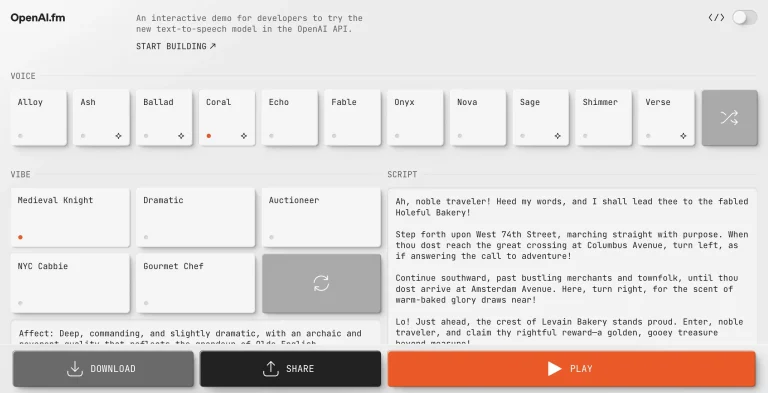
OpenAI FM is a latest technology tool that allows you to convert your written content into engaging audio. This provides a multi-purpose solution, specifically great for developers, content creators, and even individuals who want to craft AI-powered speech. It comes with built-in voice personalities and customizable speaking tones. You can adjust the sound and pace according to your requirements.
It can be utilized for a broad spectrum of applications. These include quick development of voice driven apps, AI-generated realistic voiceovers, or creating custom voice content. This tool is beginner-friendly and allows you to modify your audio outputs for precision. If you want an adaptable and easy-to-use tool, this voice generating tool is best for you. Also check, ChatPic is the best image enhancer.
Key Features of OpenAI.FM
This audio generating tool provides you with a diverse range of user-friendly functionalities. Let us dive into what sets it apart from other text-to-speech tools.
Interactive Text-to-Speech Demo
This features an engaging audio generation demo. This is extremely useful for developers who want to test AI-powered speech within the platform.
Real-Time Voice Generation
Unlike other text-to-speech tools, Open AI FM processes your text as soon as you input it. You do not have to wait for any rendering times and you get to test its voice-generating ability in real time.
Developer API Exploration
You get more than just a text-to-speech tool with OpenAI.fm. If you are a developer, it provides you with a hands-on playground that lets you explore and test OpenAI’s voice generation APIs. It allows you to interact with the API directly in a controlled, real-time environment.
Multiple Voice Options
You can get a diversity of voice character options. This lets you create an even more realistic output. These voice characters include Alloy, Ash, Ballad, Corral, Echo, and many more.
Responsive Web Interface
The tool provides a responsive and engaging web interface. This makes it user-friendly and easy-to-use.
Built With Next.js Framework
OpenAI.fm was developed using Next.js. It is an advanced react-based framework popular for its performance, developer-friendly architecture, and scalability. Next.js ensures that this provides a quick, responsive, and smooth user experience on a broad range of devices.
How OpenAI.fm Works?
If you want a hands-on, interactive environment for exploring OpenAI’s text-to-speech capabilities, OpenAI.FM has got you. It allows you to explore from simple experimentation to extensive API integration in real-time.
Real-Time Voice Testing Workflow
This platform provides you with real-time speech output. All you need to do is type your content and it will be converted to audio instantly. You can adjust the audio pace, tone, and pitch as per your preferences. This is great for demos, rapid prototyping, and experimenting API behavior before committing to full integration.
From Demo to API Integration
Once you are satisfied by the demo, this provides you with a smooth transition to API usage. Thus, letting developers connect it with their own applications. You can test API calls in real-time, ensuring proper handling of parameters and responses. This lets you move from learning in a safe environment to deploying voice AI in production.
Pricing and Access
This text generation tool provides users with free demonstration access. However, if you want it for API usage, you must have OpenAI credits.
| Plan / Pack | Price (USD) | Credits | Cost per Credit (approx.) | Notes |
|---|
| Free Trial | $0 | 10 credits | Free | Standard voice styles, basic quality |
| Basic Pack | $6.99 | 168 credits | ~$0.0416 | Access to all voices, MP3 download |
| Standard Pack (most popular) | $9.99 | 264 credits | ~$0.0378 | Higher audio quality, priority queue |
| Premium Pack | $19.99 | 720 credits | ~$0.0278 | Premium audio quality |
OpenAI API TTS Pricing (Developers)
OpenAI ka official API Text-to-Speech pricing do main formats me hota hai — per million characters (for tts-1 models) aur token-based (for new GPT-4o mini TTS):
Per Million Characters
| Model | Price (USD) | Notes |
|---|---|---|
| tts-1 (Standard) | $15.00 / 1M characters | Main TTS model |
| tts-1 HD | $30.00 / 1M characters | Premium high-def audio |
GPT-4o Mini TTS (Token-Based)
| Component | Price (USD) | What It Means |
|---|---|---|
| Text input tokens | $0.60 / 1M tokens | Text processed |
| Audio output tokens | $12.00 / 1M tokens | Generated audio |
| Approx. Cost | ~$0.015 per minute audio | Token model estimated |
API Integrations and Compatibility
OpenAI.fm isn’t just a text-to-speech demo. It’s a developer-friendly platform that allows seamless integration with OpenAI’s APIs. Users can experiment with AI-generated voices in real-time and then transition smoothly to building applications, making it a practical tool for prototyping and production use.
OpenAI Text-to-Speech APIs
Developers can access powerful TTS APIs to generate natural-sounding speech instantly through OpenAI.fm. The platform supports experimentation with parameters such as voice type, tone, pitch, and style, allowing users to understand how the API behaves and produce high-quality outputs tailored to their projects.
Integration With Existing Applications
OpenAI.FM makes it easy to integrate TTS functionality into web apps, mobile apps, or digital content projects. The platform allows developers to test API calls, validate outputs, and ensure reliable performance before deploying voice features in production, saving time and reducing potential errors.
Security and Data Privacy
OpenAI FM takes user security and data privacy seriously, providing a safe environment for experimentation while handling inputs and outputs responsibly.
OpenAI Security Standards
The platform follows industry-standard security measures, including encrypted communication, secure authentication, and ongoing system monitoring. These safeguards ensure that user data and API interactions remain protected and confidential.
Data Handling and Compliance
OpenAI FM processes user data in accordance with privacy best practices and compliance standards such as GDPR. Inputs are used solely for generating voice outputs and improving the service, ensuring that developers and creators can experiment with confidence without compromising sensitive information.
Implementation and Setup
If you simply want to access the tool for demonstration purposes, it would be instant. However, the complete AI integration takes one to two days for its extensive implementation.
Pros and Cons of OpenAI.FM
Like anything else, this tool also comes with its pros and cons. Let us go through them so that you can make an informed decision.
| Pros | Cons |
| Free to explore: Users can test the demo without cost, making it accessible for experimentation. | Limited standalone product: It’s primarily a demo/testing platform, not a full commercial TTS solution. |
| Interactive real‑time voice generation: Instant audio feedback helps with rapid prototyping and experimentation. | API credits required for full use: While the demo is free, full production use depends on paid API credits. |
| High‑quality voice output: Natural and expressive speech enhances realistic testing. | Basic feature set compared to advanced TTS tools: Lacks some advanced controls found in dedicated TTS platforms. |
| Developer‑friendly: Ideal for testing, learning, and prototyping with OpenAI’s voice API. | Limited customization UI: Voice customization options are basic in the demo interface. |
| Responsive web interface: Works smoothly on various devices without installation. | Not designed as an end‑user app: Not a standalone reader or production tool for non‑developers. |
Who Is OpenAI FM For?
OpenAI FM facilitates a huge diversity of users. You can benefit from it if you are a:
- Developer
- Product Manager
- Voice Application Creator
- AI Researcher
You can also utilize this tool if you simply want to have fun and prank someone.
Best OpenAI.fm Alternatives
OpenAI FM is a leading text-to-speech tool. However, there are numerous alternatives as well. Other top speech generating AI tools include:
- ElevenLabs
- Murf
- Speechify
- Cassidy AI
OpenAI.fm vs Other Text-to-Speech Tools
| Feature / Tool | OpenAI.fm | ElevenLabs | Murf | Speechify | Cassidy AI |
| Primary Purpose | Interactive TTS demo & API testing tool; voice generation | Premium TTS for creators & developers | AI voice generator & TTS for multimedia | TTS reading & accessibility app | AI assistant automation (not primarily TTS) |
| TTS Quality | High-quality, natural-sounding speech with neural voices | Industry-leading human-like voices with emotional nuance | Ultra-realistic voices with 200+ options | Natural voices, strong accessibility focus | Not a dedicated TTS tool (focus on AI workflow/assistants) |
| Live Demo / Playground | Interactive testing in browser free | Not typically interactive in free demo | Requires account/tools | App-based reading | Not focused on TTS |
| API Integration | Seamless via OpenAI API; great for prototyping | Yes, strong API options | Yes, voice & streaming APIs | Limited API focus (app ecosystem) | APIs but not primarily TTS |
| Voice Customization | Multiple presets + tone/emotion hints | Advanced controls (pitch, pauses, etc.) | Extensive voice/accents library | Adjustable speed & some voices | Not a TTS feature set |
| Language Support | Multilingual capabilities (50+ languages) | ~29+ languages supported | ~35 languages & 10+ accents | ~60 languages for reading | Not applicable |
| Free Tier / Cost | Free demo; API pay-per-use (~$0.015/min via API) | Free tier + paid upgrades | Free tier; paid plans for full features | Free + paid plans for premium | Paid; not TTS |
| Best For | Developers testing TTS, experimenting & prototyping | Content creators & advanced TTS users | Voiceover/video narrators & multilingual projects | Accessibility, reading & users with reading challenges | AI automation workflows |
Best Use Cases for OpenAI.FM
OpenAI FM is designed to serve developers, creators, and businesses who want to experiment, prototype, and learn with advanced text-to-speech capabilities. Its real-time features and developer-friendly environment make it ideal for multiple applications.
API Evaluation and Testing
Developers can use OpenAI.fm to test API calls, experiment with parameters, and validate outputs before integrating them into production systems. This reduces development errors and accelerates prototyping.
Voice Application Prototyping
Open AI FM allows teams to quickly build and test voice-enabled apps without committing to full implementation, helping refine workflows and assess feasibility.
Developer Learning and Education
The platform acts as a hands-on learning tool, enabling developers and AI enthusiasts to explore TTS capabilities, understand API behavior, and gain practical experience in a safe environment.
Product and Feature Demonstrations
Companies and creators can leverage OpenAI.FM to showcase voice features for clients, stakeholders, or end-users, providing a live interactive demo without building a full product.
Conclusion
OpenAI FM is a versatile and developer-friendly platform that transforms text into high-quality, customizable AI-generated speech. It serves as an ideal tool for prototyping, content creation, and learning with features like real-time voice generation, multiple voice characters, and adjustable speaking styles. Its robust security standards and data privacy compliance ensure safe experimentation. OpenAI.FM offers a powerful, forward-thinking solution for developers, creators, and businesses looking to explore AI-driven audio and bring text to life.